


AR Zone Decoded: Why AR Apps Are Now a Business Essential in 2026
Many Samsung users notice the AR Zone app on their phone and wonder what it actually does. Some search what is AR Zone, others ask what is the AR Zone app, what is the AR Zone app, or even what is ARZone app. The answer is simple: AR Zone is Samsung’s augmented reality feature hub that lets users create interactive digital experiences using their phone camera.
But AR Zone is more than just a fun mobile feature. It also shows how augmented reality is becoming part of everyday digital interaction. From virtual product previews to interactive training, AR apps are now helping businesses show information, products, and services in a more visual way.
This guide explains AR Zone in simple words, how it works, what features it offers, why AR apps matter in 2026, and how businesses can use augmented reality to improve customer engagement.
AR Zone is a Samsung augmented reality app that lets users add digital objects, drawings, emojis, stickers, measurements, and effects to the real world through a phone camera. It is mainly used on Samsung Galaxy devices for AR experiences such as AR Doodle, Deco Pic, AR Emoji, and similar camera-based tools. For businesses, AR Zone is a simple example of how AR apps can make digital content more interactive, practical, and engaging.
Key Takeaways:
- AR Zone is Samsung’s augmented reality app for camera-based interactive features.
- People search what is the AR Zone app because it often appears pre-installed on Galaxy phones.
- AR apps are now useful for retail, education, real estate, training, marketing, and product demos.
- Businesses can use AR to help users visualize products, instructions, spaces, and experiences.
- AR development works best when it solves a real user problem, not just when it looks visually impressive.
- A software development company in USA can help businesses plan and build custom AR apps for practical use cases.
What Is the AR Zone?
AR Zone is an augmented reality app found on many Samsung Galaxy phones. It gives users access to camera-based AR tools that place digital content over the real world.
In simple words, AR Zone uses your phone camera to mix real surroundings with digital effects. You can draw on real objects, add stickers, create avatar-style content, decorate photos, or use supported AR features depending on your device model and software version.
For example, instead of taking a normal photo, AR Zone may let you add virtual drawings, characters, labels, or animated elements into the camera view. This makes the content feel more interactive than a regular image or video.
Many users also search for what is arzone app or what is our zone app because the app name can be confusing. In most cases, they are referring to Samsung’s AR Zone app.
What Is the AR Zone App Used For?
The AR Zone app is used for creating augmented reality content on supported Samsung devices. Its features may vary depending on the device, region, and software version, but the purpose is usually the same: to make phone camera experiences more interactive.
Common uses include:
- Creating AR drawings on real-world scenes
- Adding stickers and effects to photos or videos
- Creating avatar-style content
- Decorating images with digital elements
- Measuring objects on supported devices
- Trying camera-based AR experiences
The app is mostly built for personal creativity, but it also introduces users to the type of AR interactions that businesses now use in more advanced apps.
How Does AR Zone Work?
AR Zone works by using your phone camera, sensors, and software to understand the real-world scene in front of you. It then places digital content on top of that camera view.
Here is the simple process:
- You open the AR Zone app or a supported AR feature.
- The camera scans your surroundings.
- The app identifies surfaces, objects, or facial features depending on the tool.
- Digital elements are placed over the camera view.
- You can record, capture, edit, or interact with the AR content.
This is the basic idea behind most AR apps. The device uses the real world as the base, while the software adds a digital layer over it.
AR Zone Features Explained
AR Zone features can change based on Samsung device models and software updates. However, these are some common AR-style features users usually associate with the app.
AR Doodle
AR Doodle lets users draw digital lines, shapes, or text over real-world scenes. The drawing appears through the camera view and can move with the scene while recording video.
Deco Pic
Deco Pic allows users to decorate photos and videos with stickers, frames, effects, and animated elements. It is more focused on fun visual content.
AR Emoji or Avatar Features
Some Samsung devices have offered AR Emoji or avatar-style tools that let users create a digital character or sticker-like version of themselves.
Quick Measure
On supported devices, Quick Measure can estimate the size or distance of real-world objects using the phone camera and sensors.
Camera-Based Effects
AR Zone also connects with different camera effects that make images and videos more interactive.
Is AR Zone Only for Samsung Phones?
AR Zone is mainly connected with Samsung Galaxy devices. It is not a general Android app that every phone brand uses in the same way.
Other phone brands may have their own AR features, camera effects, measurement tools, or third-party AR apps, but AR Zone itself is usually known as a Samsung app.
If you have a Samsung phone and do not see AR Zone, it may depend on your device model, region, or software version. Some features may appear as separate apps or inside camera/settings sections instead of one AR Zone app.
Why AR Apps Matter for Businesses in 2026
AR apps are no longer limited to filters, stickers, and entertainment. Businesses are using augmented reality to solve practical problems.
A customer can preview furniture in a room before buying it. A real estate company can show a virtual walkthrough. A training company can use AR instructions for equipment. A retail brand can let shoppers try products visually before ordering.
This is why AR apps matter in 2026. They make digital experiences more visual, interactive, and easier to understand.
For businesses, AR can help with:
- Product visualization
- Customer education
- Online shopping confidence
- Training and onboarding
- Brand engagement
- Interactive marketing
- Remote assistance
- Better decision-making
AR works best when it reduces confusion and helps users see something before they buy, learn, or act.
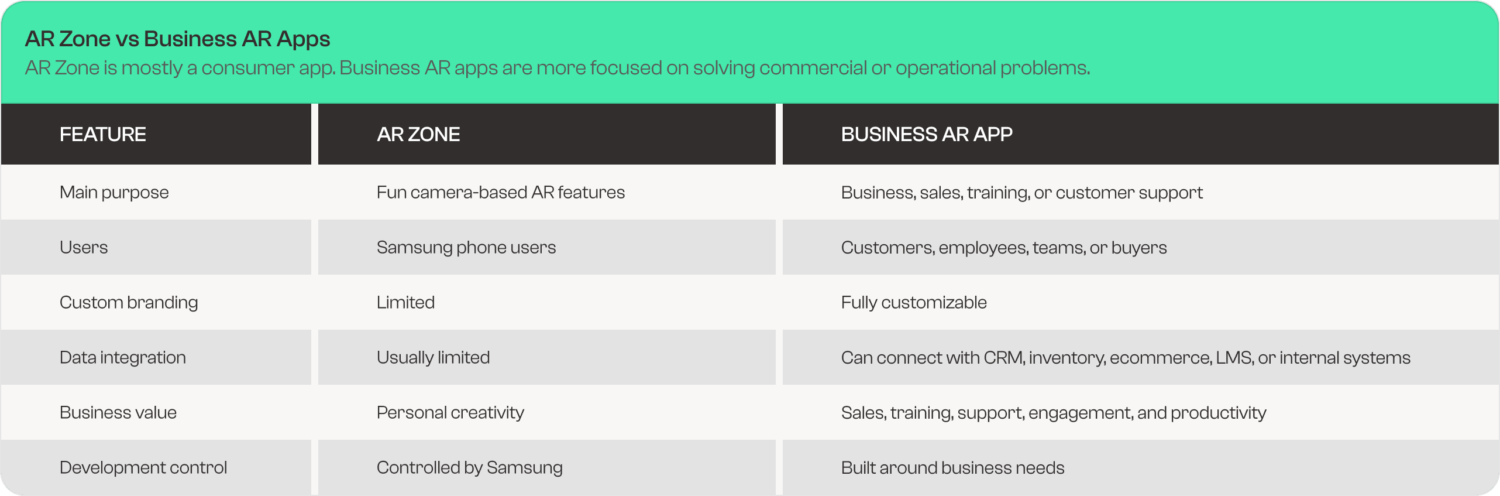
AR Zone is a good example of how simple AR works. A custom business AR app takes the same idea and applies it to a real business goal.
Real Business Use Cases for AR Apps
Retail and Ecommerce
AR can help customers preview products before buying. A furniture store can let users place a sofa in their living room through a phone camera. A cosmetics brand can offer virtual try-on. A clothing brand can support size and style visualization.
This reduces uncertainty and helps customers make better buying decisions.
Real Estate
Real estate companies can use AR for property previews, virtual staging, floor plan visualization, and interactive location guides. Buyers can understand a property better without needing every detail explained manually.
Education and Training
AR can make learning more visual. Students can explore 3D models, while employees can follow step-by-step instructions placed over real equipment or workspaces.
This is useful for technical training, safety training, healthcare education, and product demonstrations.
Manufacturing and Field Support
AR can support technicians with instructions, labels, diagrams, or repair steps shown over physical equipment. This can reduce training time and support remote problem-solving.
Marketing and Brand Campaigns
Brands can use AR for interactive packaging, event experiences, filters, product demos, and campaign engagement. When done well, AR makes marketing more memorable because users interact with it directly.
Healthcare and Wellness
AR can support anatomy education, guided exercises, patient instructions, and medical training simulations. These use cases need careful planning, accuracy, and compliance, but the value can be strong.
Benefits of AR Apps for Businesses
AR apps can help businesses create a stronger connection between digital content and real-world decisions.
Better Product Understanding
Users can see how a product looks or works before taking action. This is helpful for products that are visual, technical, or difficult to explain through text alone.
Higher Engagement
AR experiences usually require active participation. Users move their camera, interact with elements, and explore the experience. This can increase time spent with the brand.
Fewer Customer Doubts
When customers can visualize a product, space, or process, they often feel more confident. This can reduce confusion before purchase or signup.
Stronger Training Support
AR can guide users through steps in a visual way. Instead of reading a long manual, users can see instructions placed closer to the real task.
Better Brand Differentiation
A useful AR experience can help a brand stand out, especially in industries where most competitors still rely on static images, PDFs, or basic videos.
Common Mistakes Businesses Make with AR Apps
AR can be powerful, but only when it is planned properly. Many businesses make mistakes by treating AR as a visual trick instead of a useful feature.
Building AR Without a Clear Purpose
An AR app should solve a problem. If it only looks interesting but does not help the user, people may try it once and never return.
Ignoring Device Compatibility
Not every phone supports the same AR performance. Businesses need to consider Android, iOS, camera quality, browser support, and hardware limitations.
Making the Experience Too Complicated
AR should feel easy. If users need too many steps, permissions, or instructions, they may leave before using the feature.
Forgetting Performance
AR apps can become heavy. Slow loading, lag, poor tracking, and crashes can hurt the user experience.
Not Measuring Results
Businesses should track how users interact with AR features. Useful metrics may include engagement time, conversion rate, product views, completed demos, and drop-off points.
How to Build an AR App for Your Business
Building an AR app does not always mean creating a large, expensive platform from day one. Businesses can start small and expand based on user response.
Step 1: Define the Problem
Start with one clear question: what should the AR app help users do?
Examples:
- Preview a product
- Learn how something works
- Follow instructions
- Explore a space
- Compare options
- Create interactive content
Step 2: Identify the User
Decide who will use the AR app. A customer-facing AR shopping tool will be different from an employee training app.
Step 3: Choose the Right AR Type
Common AR types include:
- Marker-based AR
- Markerless AR
- Face tracking AR
- Object tracking AR
- Location-based AR
- WebAR
- Mobile app-based AR
Step 4: Create a Simple User Flow
The AR experience should be easy to start and easy to understand. Avoid unnecessary steps.
A basic flow may look like this:
Open app or link → allow camera → scan space or object → view AR content → interact → take action
Step 5: Build a Prototype
Before building a full product, create a prototype. This helps test the core experience, user interest, and technical performance.
Step 6: Test on Real Devices
AR should be tested on multiple devices, screen sizes, cameras, and lighting conditions. Real-world testing is important because AR depends on the user’s environment.
Step 7: Launch and Improve
After launch, track how users interact with the AR feature. Improve based on real behavior, not assumptions.
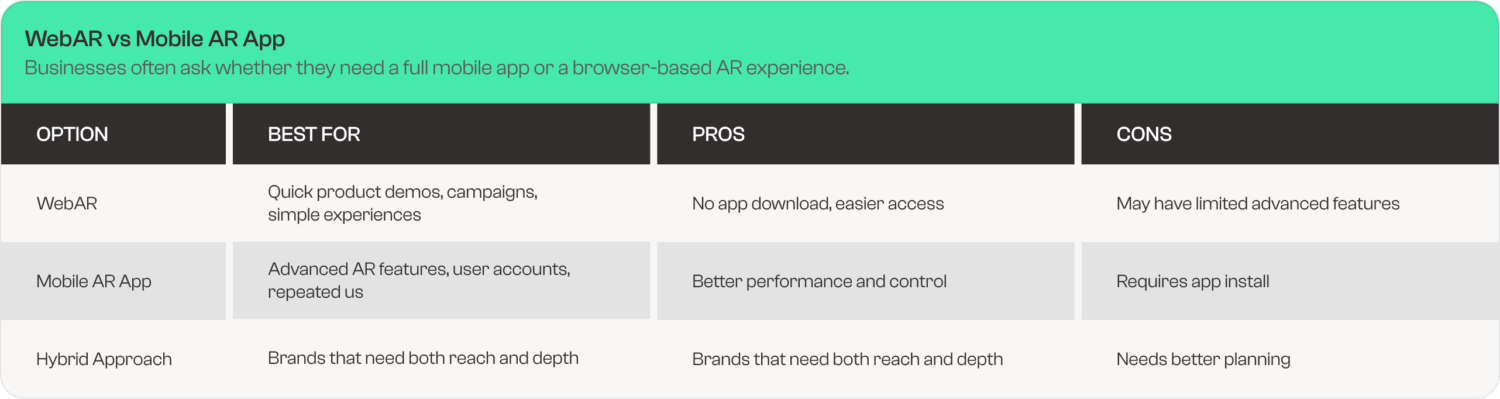
For many businesses, WebAR is a good starting point. For deeper features, a custom mobile AR app may be better.
AR Apps and Software Development in the USA
Businesses that want to build AR apps need more than design. They need planning, development, testing, performance optimization, and integration with existing systems.
This is where working with a software development company in USA can help. A skilled team can guide the business through strategy, user experience, backend integration, and app performance.
For companies in Austin, TX, and across the USA, AR can be used in ecommerce, real estate, education, manufacturing, healthcare, marketing, and service-based businesses.
A professional development team can help answer questions such as:
- Should the project use WebAR or mobile AR?
- What devices should the app support?
- Does the app need user accounts?
- Should it connect with ecommerce, CRM, or inventory systems?
- How will performance be measured?
- What features should be built first?
Why Austin Businesses Should Pay Attention to AR
Austin has a strong mix of startups, technology companies, ecommerce brands, real estate firms, healthcare businesses, and service providers. Many of these businesses compete on user experience, speed, and digital trust.
AR can help Austin businesses show products, explain services, train teams, and create more interactive customer journeys.
A local business does not need to build a complex AR platform immediately. It can begin with one practical use case, such as:
- Product preview
- Interactive sales demo
- Virtual showroom
- AR training guide
- Service explanation tool
- Event-based AR campaign
The best AR projects start with a clear business purpose.
Expert Insight: AR Should Make Decisions Easier
The strongest AR apps are not always the flashiest. They are the ones that help users make better decisions.
A furniture preview app works because the customer wants to know how the item will look in a real room. An AR training guide works because the employee wants clear instructions at the right moment. An AR product demo works because the buyer wants to understand the product before speaking with sales.
That is the real value of AR in business. It connects information with the user’s real environment.
Best Practices for AR App Development
Keep the First Experience Simple
Users should understand what to do within a few seconds. If the app needs a long explanation, the flow may be too complex.
Use Clear Visual Cues
Tell users where to point the camera, what to scan, and what action to take next.
Optimize for Speed
AR content should load quickly. Heavy 3D models, large files, and poor compression can slow down the experience.
Design for Real Environments
Users may use AR in low light, small rooms, crowded spaces, or with older devices. Test for realistic conditions.
Make the CTA Clear
If the AR experience is for business, guide users to the next step. This could be buying a product, booking a demo, requesting a quote, or contacting the team.
Track User Behavior
Measure how many users start the AR experience, complete it, interact with it, and convert afterward.
AR App Development Checklist
Before building an AR app, review this checklist:
- Clear business goal
- Defined target users
- Selected AR type
- Simple user flow
- Device compatibility plan
- Fast loading assets
- Real-world testing process
- Analytics and event tracking
- Security and privacy review
- Maintenance plan
- Clear conversion goal
- Future upgrade roadmap
This checklist helps keep the project practical and focused.
What Is the Future of AR Apps?
AR is moving from simple filters to more useful business tools. Phones are still the most common way users experience AR, but wearables and spatial devices are also becoming more visible.
In 2026, businesses should think of AR as part of a larger digital experience. It can connect with AI, ecommerce, training, customer support, product visualization, and analytics.
The future of AR apps is not only about entertainment. It is about helping people see, understand, and act faster.
Final Recommendation
If you are searching what is AR Zone or what is the AR Zone app, the simple answer is that it is Samsung’s augmented reality app for interactive camera-based features. It lets users create digital effects, drawings, avatar-style content, and AR experiences through supported Galaxy devices.
For businesses, AR Zone is also a useful example of where digital interaction is heading. Customers do not always want to read long explanations. Sometimes they want to see how something looks, works, or fits into their real environment.
If your business wants to explore AR apps, start with one practical use case. Focus on solving a clear problem, improving customer understanding, or making a process easier. Kernel Tech helps businesses plan and build custom digital products, including AR-ready experiences, web apps, mobile apps, and software solutions for companies in Austin, TX, across the USA, and worldwide.
FAQs
What is AR Zone?
AR Zone is Samsung’s augmented reality app that lets users create interactive camera-based content such as AR drawings, stickers, effects, avatars, and supported AR features on Galaxy devices.
What is the AR Zone app used for?
The AR Zone app is used for augmented reality features on Samsung phones. Users can create AR doodles, decorate photos and videos, use avatar-style tools, and access camera-based AR functions.
What is the AR Zone app on my Samsung phone?
The AR Zone app on your Samsung phone is a built-in or supported app for augmented reality features. It uses your camera to place digital content over real-world scenes.
Is AR Zone necessary?
AR Zone is not necessary for basic phone use. It is mainly used for AR camera effects, creative content, and supported augmented reality features. If you do not use AR tools, you may not need it often.
Can I uninstall AR Zone?
Whether you can uninstall AR Zone depends on your Samsung device and software version. Some devices may allow disabling or removing certain AR-related apps, while others may keep them as system features.
What is ARZone app?
ARZone app is usually another way users refer to Samsung’s AR Zone app. It means the same augmented reality feature hub found on many Samsung Galaxy devices.
What is our zone app?
Many people search “what is our zone app” by mistake when they mean “AR Zone app.” AR Zone is Samsung’s augmented reality app for interactive camera effects and AR features.
Why are AR apps important for businesses?
AR apps help businesses make products, services, training, and customer experiences more visual and interactive. They can support product previews, virtual demos, education, onboarding, marketing, and better decision-making.
